
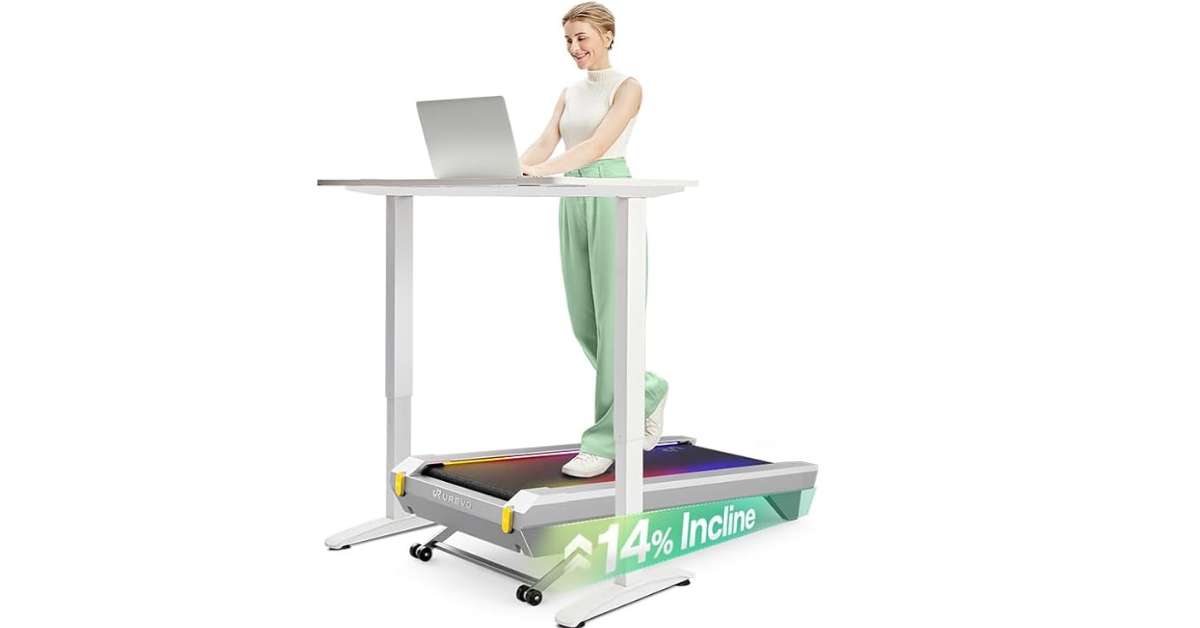
The Modern Work-From-Home Dilemma
Let me paint you a picture. It’s 2:00 PM on a Wednesday. You’ve been glued to your computer screen since 8:00 AM. Your back aches. Your eyes are strained. Your brain feels like it’s wading through molasses. You haven’t moved more than fifty steps in the last six hours. Sound familiar?
This was my reality. As someone who runs an internet business from home, my work demands kept me chained to my desk. The to-do list never ended. Deadlines loomed. Client calls stacked up. And somewhere in between, my health was taking a backseat. I’d look at my fitness tracker at the end of the day and cringe at the step count. Triple digits. On a good day.
I knew I needed to move more. But how? I couldn’t exactly step away from my computer for an hour to hit the gym when I had back-to-back Zoom calls. I needed a solution that would let me work and exercise simultaneously. That’s when I discovered the game-changing world of under-desk treadmills.
Enter the UREVO Cyberpad for Office — a sleek, smart walking pad treadmill that has completely transformed how I approach my workday. In this comprehensive review, I’ll walk you through everything you need to know about this innovative piece of fitness technology. Whether you’re a remote worker, a busy professional, or someone simply trying to break free from the sedentary trap, this under-desk treadmill might just be the solution you’ve been searching for.
What Exactly Is an Under-Desk Treadmill?
Before we dive deep into the UREVO Cyberpad, let’s talk about the category itself. An under-desk treadmill — sometimes called a walking pad or walking desk treadmill — is a compact, lightweight treadmill designed specifically to fit beneath a standing desk. Unlike traditional treadmills that take up a significant footprint in your home gym, these space-saving marvels allow you to walk at a comfortable pace while you type, read emails, attend virtual meetings, or even take phone calls.
The concept is brilliantly simple: combine movement with work to combat the health consequences of prolonged sitting. Research has shown that sitting for extended periods increases the risk of obesity, cardiovascular disease, diabetes, and even certain cancers. The human body simply wasn’t designed to remain stationary for eight to ten hours a day.
The UREVO Cyberpad takes this concept and elevates it to new heights — literally and figuratively. With its auto-incline technology, smart app integration, and durability that promises years of use, this walking pad treadmill sets a new standard in the home office fitness space.
My Personal Journey with Sedentary Work Life
Before I get into the nitty-gritty details of the UREVO Cyberpad, I want to share a bit of my personal story. I think many of you will relate.
When I first started working from home, I was thrilled. No more commuting. No more office distractions. I could work in my pajamas if I wanted to. But as the months went by, I started noticing some concerning changes in my body and mind.
My energy levels plummeted in the afternoon. I’d find myself reaching for coffee at 3 PM just to make it through the rest of the workday. My lower back would ache after sitting for just a few hours. I’d feel stiff and uncomfortable during my evening activities. And my brain? Forget about it. The brain fog was real. I’d struggle to focus, my creativity would dry up, and simple tasks would take twice as long as they should.
Then there was the guilt. I’d finish a grueling eight-hour workday, collapse on the couch, and feel terrible about not exercising. But I was exhausted! How could I possibly find the energy to go to the gym after spending all day mentally drained?
I tried various solutions. I bought a standing desk, thinking that would help. And it did, somewhat. But standing in one place for hours isn’t much better than sitting. My feet would hurt, and I’d find myself shifting my weight constantly, never really comfortable.
I tried taking walking breaks, but they always felt rushed. I’d walk around my apartment for five minutes, feel slightly better, and then return to my desk for another few hours of stillness. It wasn’t enough. I needed sustained movement throughout my entire workday.
That’s when I started researching under-desk treadmills. And that’s when I discovered the UREVO Cyberpad.
Unboxing the UREVO Cyberpad: First Impressions Matter
Let’s start from the very beginning. When my UREVO Cyberpad arrived at my doorstep, I was genuinely excited. The box was substantial but manageable — I could carry it inside without any help. I cleared a space in my kitchen and got to work.
What’s in the Box?
Here’s exactly what you’ll find when you open your UREVO Cyberpad package:
| Item | Description |
|---|---|
| UREVO Cyberpad Unit | The main walking pad treadmill, wrapped in protective plastic to prevent shipping scratches |
| Power Cord | Standard three-pronged electrical cord |
| Remote Control | Compact remote with batteries included |
| User Manual | Detailed guide with illustrations and connection instructions |
| Lubrication Oil | For routine maintenance to keep the belt running smoothly |
| Hex Key | For belt tension adjustments if needed |
| QR Code Card | Quick access to download the UREVO app |
Build Quality: A Closer Look
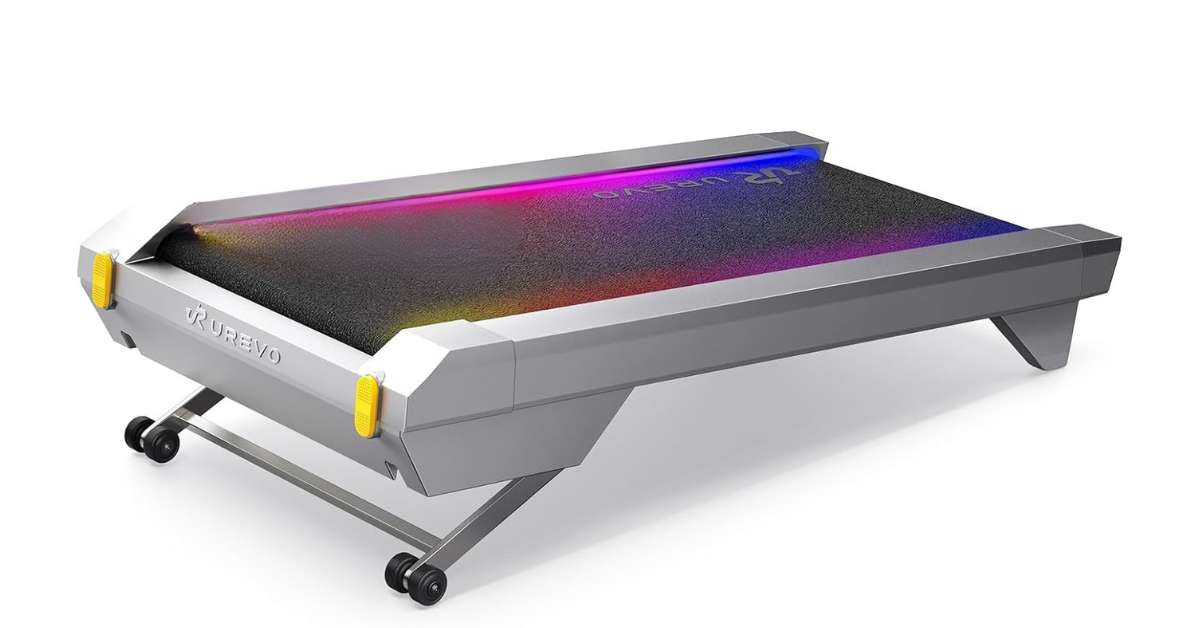
The moment I unwrapped the Cyberpad, I could tell this was a premium product. The sleek, modern design immediately caught my eye. This isn’t one of those clunky, industrial-looking treadmills that you’d be embarrassed to have in your living space. The UREVO Cyberpad is aesthetically pleasing, with clean lines and a sophisticated black finish that wouldn’t look out of place in a high-end office.
But aesthetics aren’t everything. What really impressed me was the build quality. The frame feels incredibly sturdy — there’s no wobbling or flimsiness here. This is clearly a walking pad treadmill that’s built to last. The high-quality caster wheels on the bottom are smooth and responsive, making it effortless to move the unit around your space.
The running belt itself feels durable and well-constructed. It’s designed to withstand significant mileage, and we’ll get into those durability numbers shortly. The deck is wide enough to walk comfortably without feeling like you’re going to step off the edge, yet compact enough to fit under most desks.
One thing I particularly appreciated was the thoughtful packaging. The UREVO Cyberpad arrived wrapped in plastic to prevent any scratching during shipping. All the accessory parts came in their own individual packages, clearly labeled and organized. It was clear that UREVO cares about the customer experience from the moment the box arrives.
Why the UREVO Cyberpad Stands Out
Now, let’s get into what makes this under-desk treadmill so special. I’ve been using it for months, and these are the features that genuinely impressed me.
Unmatched Durability: 6,000 Hours of Walking
One of the most impressive specifications of the UREVO Cyberpad is its durability rating. This under-desk treadmill is built for 6,000 hours of use. To put that into perspective, if you were to use it 24 hours a day, 7 days a week, it would last you over eight months. But let’s be realistic — most of us are walking for one to two hours a day during work hours.
At that pace, the Cyberpad could easily last you 5 to 10 years. This isn’t a disposable piece of equipment that will break down after a few months. UREVO has engineered this walking pad treadmill to withstand serious mileage, making it a long-term investment in your health and productivity.
The durability comes from the high-quality motor and robust construction materials. The belt is designed to handle the friction and wear of thousands of walking miles. The motor is built to run smoothly and quietly for extended periods. This isn’t a treadmill that’s going to give out on you after a year of use.
Space-Saving Design That Fits Under 90% of Desks
The biggest challenge with adding fitness equipment to your home office is space. Traditional treadmills are massive. They dominate rooms and often end up being used as expensive clothing racks because they’re too bulky to keep in a convenient location.
The UREVO Cyberpad solves this problem brilliantly. With a sleek 6.4-inch (16.3 cm) profile, this under-desk treadmill effortlessly fits under 90% of office desks. Whether you have a standing desk or a traditional desk setup, you can slide this walking pad underneath and get to work.
When you’re not using it, the Cyberpad tucks away easily. I keep mine under my coffee table in the living room when my workout is done. It’s completely out of sight — no one would even know I have a treadmill in my apartment. This is a huge win if you’re working with limited space or if you’re particular about your home aesthetics.
Lightweight and Portable
Despite its sturdy construction, the UREVO Cyberpad is surprisingly lightweight enough for most people to handle easily. I can pick mine up and move it to different rooms without straining. The built-in caster wheels make it even easier.
Here’s something I was genuinely surprised by: the wheels glide smoothly even on carpet. If you don’t have hardwood floors, don’t worry. The Cyberpad rolls effortlessly over carpeted surfaces, allowing you to position it wherever you need it. This level of portability means you can walk while working in your office, move it to the living room for a walking meeting, or even tuck it away in a closet when guests come over.
The portability also means you’re not locked into one location. Some days I want to work in my home office. Other days I prefer the living room. With the UREVO Cyberpad, I can easily move my walking desk setup to wherever I’m most comfortable and productive.
Incredibly Quiet Operation
One of my biggest concerns before purchasing an under-desk treadmill was noise. I take a lot of phone calls and participate in video meetings throughout the day. If my walking pad was loud enough to be heard by clients and colleagues, it would be completely unusable for my work style.
I’m happy to report that the UREVO Cyberpad is whisper-quiet. During my phone calls, the person on the other end has absolutely no idea I’m walking. The motor hums softly in the background, never rising to a disruptive level. This quiet operation makes it suitable for shared office spaces, libraries, or any environment where noise would be a concern.
The quietness comes from the advanced motor technology and quality construction. The belt moves smoothly without the squeaking or grinding sounds you sometimes hear on cheaper treadmills. Even at higher speeds, the noise level remains impressively low.
The Incline Feature: A Total Game-Changer
Here’s where the UREVO Cyberpad truly differentiates itself from other walking pad treadmills. Most under-desk treadmills are flat — you walk on a level surface, which is fine but not optimal for calorie burning. The Cyberpad, however, features Mega Lift technology that provides up to 14 levels of incline.
Why does this matter? Walking on an incline forces your body to work harder. Your glutes, hamstrings, and calves engage more deeply. Your heart rate increases. And most importantly, your calorie burn skyrockets. According to UREVO, the incline technology enhances your calorie-burning efficiency by an incredible 230% compared to walking on a flat surface.
The incline is controlled through the remote or the app, and it’s incredibly responsive. The deck raises smoothly and steadily, and you can adjust it in real-time as you walk. The 14% incline maximum is substantial — you’ll definitely feel the burn, even at a slower walking pace.
I personally love using the incline feature during the last 15 minutes of my walking session. I gradually increase the incline to really challenge myself and maximize my calorie burn. It’s like having a mini hill workout right under my desk.
Speed Range for Every Fitness Level
The UREVO Cyberpad offers a maximum speed of 4 mph. A typical walking pace is around 2 mph, so you have plenty of room to increase your intensity. This speed range is perfect for a walking desk setup because you don’t want to go too fast while typing or working. It’s designed for steady, sustainable movement that doesn’t interfere with your work tasks.
The speed is easily adjustable using either the remote or the app. The remote has plus and minus buttons that make quick adjustments simple. You can speed up when you’re on a break and slow down when you need to focus on detailed tasks. This flexibility is essential for a walking desk setup.
I usually walk at around 1.8 to 2.2 mph when I’m typing and need to focus. When I’m reading or on a call, I can speed up to 2.5 or 3 mph. Having that control at my fingertips makes the whole experience seamless.
The 256 RGB Light Display: A Fun Touch
One feature that I didn’t expect to love as much as I do is the RGB light display. The UREVO Cyberpad for Office has a 256 RGB multi-color ribbon display that adds a modern and stylish touch to the treadmill.
You can control the lighting through the remote by pressing the light button on the bottom. Here are the options:
- 5 Preset Colors: Blue, orange, red, green, and turquoise
- 256 Custom Colors: Use the color wheel in the app to select any shade you want
- 3 Light Modes:
- Remain Light: The light stays on continuously
- Breathing Light Effect: The light gently pulses
- Follow the Running Belt: The light moves at the speed of the belt itself
I personally love the “follow the running belt” mode. It makes the walking experience feel more dynamic and engaging. The breathing mode is also great for a more relaxed, meditative walk. It’s a small touch, but it makes the Cyberpad feel like a truly premium product.
Smart App Integration and World Tour Mode
If there’s one feature that makes the UREVO Cyberpad feel like a premium walking desk treadmill, it’s the companion app. The UREVO app transforms your workout from a mundane walking session into an interactive, engaging experience.
Real-Time Metrics Tracking
The app functions as a comprehensive wellness hub. It monitors your real-time metrics:
- Time elapsed during your workout
- Distance traveled on your Cyberpad
- Calories burned throughout your session
- Total steps taken
- Current speed and incline levels
After your workout, the app generates a detailed report showing all these statistics. You can even see your leaderboard ranking compared to other UREVO users. I ranked in the top 25% for one of my workouts, which gave me a nice little motivational boost!
Long-Term Trend Analysis
One of the app’s most valuable features is its ability to track your long-term trends. You can view your progress weekly, monthly, or annually. This helps you see how your fitness is improving over time and keeps you accountable to your goals. Having this visibility has been incredibly motivating for me — I can literally see my consistency paying off.
Preset Workouts for Variety
The app comes loaded with various preset workouts and challenges. These are designed to keep your routine fresh and prevent boredom. One of the featured workouts is HIIT 40, a 40-minute interval fat-burning run. In this mode, the treadmill automatically adjusts the speed or incline according to the preset program. This automation means you don’t have to think about your workout — you just follow along.
I appreciate that I don’t always have to manually adjust the settings. The preset workouts do the work for me, and I can just focus on my actual work tasks while the Cyberpad takes care of the fitness programming.
Rhythm Fit: Move to the Beat
The UREVO app also includes a feature called Rhythm Fit. This is exactly what it sounds like — you can move to the beat of the music. The treadmill responds to the music’s rhythm, creating a more immersive and enjoyable workout experience. Sometimes music is all I want during my workouts, and this feature delivers that perfectly.
I’ve found that walking to the beat makes the time fly by. Before I know it, I’ve been walking for 45 minutes and barely noticed. It’s amazing how much more enjoyable exercise can be when it’s synced with music.
World Tour Mode: Travel While You Walk
This is hands-down my favorite feature of the UREVO app. The World Tour Mode allows you to choose from various locations around the world to explore while you exercise.
Here’s how it works: You select a destination — maybe you want to walk through the beautiful landscapes of Iceland, or perhaps you’re in the mood for a stroll along Lake Como in northern Italy. The app displays immersive scenery from that location while you walk on your Cyberpad.
Some of the destinations you can choose from include:
- Iceland Waterfall Run: Inspiring, invigorating landscapes that motivate you to work harder
- Tasmania Nut Climb: Explore the town of Stanley, Tasmania while climbing the famous Nut
- Berlin Historical Tour: Run through the history of Berlin — perfect if you’re planning to visit for conferences
- Elm Forest Sunny Day: Experience nature even when you’re stuck inside your home office
- Lake Como Italy Stroll: Revisit this beautiful location or experience it for the first time
For someone like me who loves to travel but can’t always afford the time or money, this feature is incredible. It allows me to explore the world from the comfort of my home office while getting my exercise in. I’m learning about places I want to visit, getting motivated to travel more, and staying fit all at the same time.
I particularly love the Iceland tour. The waterfall scenes are absolutely breathtaking, and they make me feel like I’m actually there. It’s a wonderful escape from the walls of my home office.
Health Benefits I’ve Experienced
The UREVO Cyberpad isn’t just a convenience — it offers genuine, science-backed health benefits. Here’s what I’ve personally experienced since I started using it.
Improved Cardiovascular Health
I was genuinely worried about my heart health as I got older. Sedentary behavior is a major risk factor for heart disease, and I was sitting for hours on end. Using the Cyberpad has made such a difference. Even just walking at a moderate pace for an hour a day gets your heart pumping and improves your cardiovascular fitness over time.
My resting heart rate has actually decreased since I started using the Cyberpad regularly. That’s a clear sign that my heart is getting stronger and more efficient.
Weight Management and Calorie Burning
The math is simple: walking burns calories. When you incorporate walking into your workday, you’re creating a consistent calorie deficit that supports weight management. With the incline feature, you can significantly boost that calorie burn. Remember, walking at an incline burns up to 230% more calories than walking on a flat surface.
I’ve noticed my clothes fitting better and my energy levels stabilizing. I’m not looking for snacks out of boredom or stress anymore because I’m actually moving and engaged in my work.
Reduced Risk of Chronic Disease
Research consistently shows that regular physical activity reduces the risk of chronic diseases including Type 2 diabetes, certain cancers, and cardiovascular disease. By incorporating walking into your workday, you’re actively reducing your risk factors for these serious health conditions.
I feel more confident about my long-term health now that I’m consistently active during my work hours.
Improved Posture and Reduced Back Pain
Sitting for extended periods is terrible for your posture. It weakens your core muscles, tightens your hip flexors, and can cause chronic back pain. Walking while working engages your core muscles naturally, improves your posture, and can help alleviate existing back pain.
My lower back pain has almost completely disappeared since I started using the Cyberpad. I used to have terrible pain at the end of the workday, and now I barely even think about it.
Enhanced Cognitive Function
This is one of the most immediate benefits I noticed. When I walk while working, my brain fog disappears. I think more clearly, I’m more creative, and I have better focus. This isn’t just anecdotal — research shows that walking increases cerebral blood flow, delivering more oxygen and nutrients to your brain. This boosts cognitive function, improves memory, and enhances problem-solving abilities.
My writing and creative work have improved significantly because my mind feels sharper and more agile. I’m able to come up with better ideas and execute them more effectively.
Better Mood and Reduced Stress
Exercise releases endorphins, the body’s natural mood elevators. Walking while working has noticeably improved my mood throughout the day. I feel less stressed, more positive, and more motivated to tackle challenging tasks. The gentle, rhythmic movement is almost meditative, helping me maintain a calm, focused state.
I used to get really stressed out by tight deadlines and demanding clients. Now I feel more balanced and able to handle pressure without losing my cool.
Increased Energy Levels
Remember that 3 PM energy crash I used to experience? Gone. The consistent movement keeps my energy levels stable throughout the day. I’m not reaching for caffeine to survive the afternoon anymore. The increased circulation and oxygenation keeps me feeling alert and energized.
I’m actually more productive in the afternoons now than I was in the mornings before I started using the Cyberpad.
Better Sleep Quality
Since I started using the UREVO Cyberpad, I’ve noticed a significant improvement in my sleep quality. The increased physical activity helps regulate my circadian rhythm, and I fall asleep more easily at night. I wake up feeling more rested and ready to tackle the day.
I used to toss and turn for hours before falling asleep. Now I’m usually asleep within 15 minutes of hitting the pillow.
How I Integrate the Cyberpad Into My Workday
Let me share how I actually use this under-desk treadmill in my daily routine. Theory is great, but practice matters more.
Setting Up My Walking Desk
First, I position my standing desk at the right height. I want to be able to type comfortably while walking. The desk should be high enough that my arms are at a 90-degree angle when typing, but not so high that my shoulders are raised.
The UREVO Cyberpad goes directly under the desk. I leave about a foot of space between the front of the treadmill and the desk legs so I’m not bumping into anything as I walk.
My Walking Schedule
I don’t walk all day. That would be exhausting and impractical. Instead, I’ve developed a schedule that works for me:
| Time | Activity |
|---|---|
| 9:00 AM – 10:00 AM | Walking while catching up on emails and planning the day |
| 11:00 AM – 12:00 PM | Walking during a brainstorming session or creative work |
| 2:00 PM – 3:00 PM | Walking while doing routine tasks that don’t require intense focus |
| 4:00 PM – 5:00 PM | Walking while wrapping up the day’s tasks |
This gives me about 4 hours of walking spread throughout my workday. I take breaks in between to sit, stretch, and rest my legs.
What Tasks Work Best While Walking
Not all tasks are suitable for walking. Here’s my breakdown:
Great for Walking:
- Reading and responding to emails
- Administrative tasks
- Creative brainstorming
- Research and reading
- Audio/video calls where I’m not screen-sharing
- Note-taking and documentation
- Training videos or webinars
Not Ideal for Walking:
- Detailed editing or formatting
- Complicated coding or programming
- Tasks requiring very fine motor skills
- Screen-sharing presentations (I don’t want people to get motion sick)
- Anytime I need to be completely still and focused
Phone Calls While Walking
One of my favorite things about the Cyberpad is that I can take phone calls while walking. The treadmill is so quiet that the person on the other end has no idea I’m moving. I’ve had clients compliment me on how focused and energetic I sound during calls — little do they know I’m getting my steps in while we’re talking.
The gentle movement actually helps me sound more natural and confident on calls. I’m not fidgeting in my chair or feeling restless. I can focus fully on the conversation while my body stays in motion.
Setting Up Your UREVO Cyberpad: Step-by-Step Guide
Getting started with the UREVO Cyberpad is simple. Here’s how I did it:
Step 1: Unbox and Inspect
Open the box and remove all components. Make sure nothing is damaged. Check that all accessories are present.
Step 2: Position the Cyberpad
Place the walking pad treadmill where you want it. Make sure there’s enough space around it for safe walking. If you’re using it under a desk, position it so you can comfortably walk while typing.
Step 3: Connect the Power
Plug the power cord into the Cyberpad and then into a wall outlet. Make sure the cord isn’t creating a tripping hazard.
Step 4: Download the App
Scan the QR code on the Cyberpad to download the UREVO app. The app is available for both iOS and Android devices. The setup process within the app is straightforward and walks you through the connection process.
Step 5: Pair the Remote
The remote comes with batteries already included. It should pair automatically with the Cyberpad. If it doesn’t, the user manual provides troubleshooting steps.
Step 6: Test Walk
Start with a slow speed and take a few steps to get comfortable. Adjust the speed and incline as needed. Make sure everything feels stable and secure.
Step 7: Set Up Your Desk
If you’re using a standing desk, adjust it to the right height. Your arms should be at a 90-degree angle when typing. Your posture should be upright and comfortable.
Step 8: Start Walking!
You’re ready to go. Start with shorter sessions and gradually increase as you get used to walking while working.
Tips for Getting Started with Your Walking Desk
If you’re new to walking while working, here are some tips to help you transition smoothly:
Start Slow
Don’t jump into walking full-time right away. Start with 15-20 minute sessions and gradually increase. Your body needs time to adjust to walking while working.
Wear Comfortable Shoes
Good walking shoes make a huge difference. They provide support and reduce fatigue. I keep a pair of comfortable sneakers at my desk for walking sessions.
Adjust Your Posture
Maintain good posture while walking. Keep your shoulders back, head level, and core engaged. Don’t lean on your desk.
Take Breaks
Just because you can walk all day doesn’t mean you should. Take regular sitting breaks to rest your legs. I find that alternating between walking and sitting works best for me.
Hydrate
You’ll be sweating more, even at a slow pace. Keep water at your desk and drink regularly.
Consider Your Workflow
Some tasks are easier while walking than others. Plan your day so that walking-friendly tasks coincide with your walking sessions.
Listen to Your Body
If you experience any pain or discomfort, stop. Adjust your speed, incline, or posture. Everyone’s body is different, so find what works for you.
The Science Behind Walking While Working
If you’re still skeptical, let’s look at the science. Research supports the benefits of walking while working.
Research on Sedentary Behavior
A study published in the Annals of Internal Medicine found that adults who sit for more than 13 hours a day have a 200% higher risk of death than those who sit for less than 11 hours. The risks are significant, even for people who exercise regularly. This suggests that reducing sitting time is crucial for health, regardless of other exercise habits.
Research on Walking and Work Productivity
A study conducted by the University of Minnesota found that walking while working can improve cognitive function and productivity. Participants reported increased creativity and better problem-solving abilities. The study suggested that the increased blood flow to the brain during walking enhances cognitive performance.
Research on Calorie Burning
Walking at 2 mph burns approximately 100 calories per hour. With the incline feature, that number can increase significantly. Over a typical work week, this can translate to meaningful weight management benefits.
Research on Long-Term Health
Regular physical activity reduces the risk of chronic diseases. Walking for 30 minutes a day is associated with lower rates of cardiovascular disease, Type 2 diabetes, and certain cancers. By incorporating walking into your workday, you’re making a long-term investment in your health.
The UREVO Cyberpad App: A Deeper Dive
Let me spend more time on the app because it’s genuinely one of the best features of the UREVO Cyberpad walking desk setup.
Home Screen Dashboard
When you open the app, you’ll see a clean dashboard showing your current statistics. The layout is intuitive and easy to navigate. You can see at a glance how you’re doing.
Workout History
The app keeps a complete history of all your workouts. You can go back and see your progress over days, weeks, and months. This is incredibly motivating when you can see how far you’ve come.
Leaderboard
The leaderboard feature adds a gamification element. You can see how you compare to other UREVO users. I found myself walking a little bit longer just to improve my ranking!
Preset Workout Library
The app has a growing library of preset workouts. Each workout has different goals — some focus on fat burning, others on endurance, and others on speed. The variety keeps things fresh.
World Tour Mode Details
World Tour mode deserves its own section. Here’s how it works:
You select a destination from a beautiful visual interface. Once you choose, you’re taken to a virtual tour of that location. The scenery is immersive and motivating. As you walk on your Cyberpad, the scenery changes as if you’re moving through that location.
The tours are accompanied by ambient sounds that enhance the experience. I found myself walking longer just to see more of the scenery!
Rhythm Fit
The Rhythm Fit feature syncs your walking pace with the beat of the music. The app has a library of music with different beats per minute. You choose a track, and the Cyberpad adjusts your speed to match the beat. It’s a fun way to stay motivated and in rhythm.
Maintenance Tips for Your UREVO Cyberpad
To ensure your under-desk treadmill lasts for years, follow these maintenance tips:
Regular Lubrication
The UREVO Cyberpad comes with lubrication oil. Apply it periodically to keep the belt moving smoothly. The user manual provides specific instructions for application.
Belt Tension Check
The included hex key allows you to adjust belt tension if needed. If the belt starts slipping or feels loose, a quick adjustment will solve the problem.
Keep It Clean
Dust and debris can accumulate on the running belt and motor. Wipe down the Cyberpad regularly with a soft, dry cloth. Don’t use harsh chemicals or water.
Proper Storage
When not in use, store the Cyberpad in a dry, cool place. Avoid extreme temperatures and humidity.
Check for Loose Parts
Periodically check that all screws and bolts are tight. This is a quick check that can prevent bigger issues down the line.
Use a Mat
Consider putting a small mat under the Cyberpad to protect your floors and reduce vibration. This is especially important for carpeted areas.
What Others Are Saying
I’m not the only one who loves the UREVO Cyberpad. Here’s what other users are saying:
- “Game Changer for My Workday” — “I’ve been using the UREVO Cyberpad for three months now, and my productivity has improved dramatically. I feel so much more energized and focused. I also love the World Tour mode. I’ve ‘visited’ places I’ve never been and it makes walking so enjoyable!”
- “Incline Feature Is Incredible” — “I’ve tried other under-desk treadmills, but the incline on this one is a game-changer. I can burn so many more calories without having to walk faster. My legs are getting stronger and I’m sleeping better.”
- “Perfect for My Home Office” — “I was skeptical at first, but the UREVO Cyberpad is amazing. It’s quiet, easy to move, and fits perfectly under my desk. I’ve increased my daily steps from 3,000 to 12,000. I can’t recommend it enough.”
- “App Keeps Me Motivated” — “The app is fantastic. I love the leaderboard and the variety of workouts. The World Tour mode is brilliant. I look forward to my walking sessions now!”
Frequently Asked Questions ( FAQs)
How much weight can the UREVO Cyberpad support?
The Cyberpad has a generous weight capacity that can accommodate most users comfortably. The solid construction ensures stability even at higher weights.
Is the UREVO Cyberpad safe to use on carpet?
Yes! The wheels roll smoothly on carpet, and the sturdy base provides stability. Just make sure the carpet isn’t too thick or shaggy, as that might affect the unit’s stability.
How long does it take to set up?
Less than 15 minutes from unboxing to walking. The setup is incredibly straightforward.
Can I use the Cyberpad without the app?
Absolutely. You can control the speed and incline using the remote control. The app adds features but isn’t mandatory.
What’s the warranty?
The UREVO Cyberpad comes with a solid warranty. Check the current Amazon listing for specific warranty details.
How do I clean the Cyberpad?
Wipe down the surface with a soft, dry cloth. Don’t use harsh chemicals or water. Lubricate the belt as recommended in the user manual.
Can I jog on the Cyberpad?
The Cyberpad is designed for walking, with a maximum speed of 4 mph. It’s not designed for running or jogging.
Price and Value Analysis
The UREVO Cyberpad is priced as a premium under-desk treadmill. But is it worth the investment?
What You Get
- Premium build quality
- 6,000 hours of durability
- 14 levels of incline
- Full app integration
- World Tour mode
- Compact, space-saving design
- Quiet operation
- Remote control
- Comprehensive warranty
What You Spend
The Cyberpad is more expensive than basic walking pads, but it’s more affordable than premium brands like WalkingPad while offering similar or better features.
Value Calculation
When you consider the health benefits, increased productivity, and durability, the UREVO Cyberpad offers excellent value. Let’s do a rough calculation:
If you use the Cyberpad for 1 hour per day, 5 days a week, that’s 260 hours per year. Over 5 years, that’s 1,300 hours of use. The cost per hour is minimal when you consider the health benefits and improved work performance.
Think of it this way: How much would you pay to reduce your risk of chronic disease, improve your cognitive function, and increase your daily movement? The Cyberpad is an investment in your long-term health and productivity.
Conclusion: Is the UREVO Cyberpad Right for You?
After months of using the UREVO Cyberpad for Office, I can confidently say it’s one of the best investments I’ve made in my home office setup. It has transformed my workday, improved my health, and boosted my productivity.
I used to dread the afternoon slump. Now I look forward to walking while I work. I used to worry about my sedentary lifestyle. Now I’m more active than I’ve been in years. I used to struggle with brain fog and low energy. Now I’m focused, alert, and productive.
The UREVO Cyberpad has completely changed how I approach my workday. I’m moving more, thinking clearer, and feeling better than I have in years. The incline feature, the app integration, and the durable construction make it stand out from the competition.
If you’re tired of sitting all day and want to take control of your health without sacrificing your work performance, the UREVO Cyberpad is absolutely worth considering. It’s more than just an under-desk treadmill — it’s a tool for better living.
The World Tour mode alone has made walking so much more enjoyable. I’ve “visited” places I’ve never been, explored new landscapes, and felt more connected to the world even while stuck in my home office.
The incline feature has helped me maximize my calorie burn without having to walk faster or longer. I’m getting more out of every minute I spend on the Cyberpad.
And the durability gives me peace of mind that this investment will last for years to come. I don’t have to worry about the motor burning out or the belt wearing down after a few months.
Where to Buy
The UREVO Cyberpad for Office is available on Amazon. There’s currently a special promotion running, so check the link in the description for the best price.
What’s Next?
If you’ve made it this far, you’re serious about improving your health and productivity. That’s fantastic. The first step is awareness. The second step is action.
Order your UREVO Cyberpad today and start your journey toward a healthier, more productive work life. Your body — and your brain — will thank you.
A Final Invitation
I’d love to hear from you. How do you stay active while working? Have you tried an under-desk treadmill before? What challenges have you faced with staying healthy during long workdays? Drop your thoughts in the comments below. I read every comment and respond to as many as I can.
Don’t forget to subscribe to stay updated on more health, productivity, and home office tips. I’m always sharing new ideas to help you live better and work smarter.
Here’s to less chair time and more active time!
Disclaimer
This review is based on my personal experience with the UREVO Cyberpad for Office. Results may vary. Always consult with your healthcare provider before starting any new exercise program. The views expressed in this review are my own and represent my honest opinion of the product.
Thank you for reading! If you found this review helpful, please share it with someone who might benefit from a healthier workday. Together, we can break free from the sedentary trap and create a healthier, more productive work culture.
Now ⚡ Deal 🔥 Check Best Price